Forest App Alternative: StudyAide vs Forest
By StudyAide (Sound Producer & App Developer)·Published ·Updated
Forest and StudyAide are both apps that help you focus, but they aim at different problems. Not which one is better, but which one fits you, laid out as it is.
What Forest does well
Forest is known for its gamified approach where a tree on screen grows while you focus. Turn on the timer and leave the app and the tree withers, so a motivation to "protect the tree" arises naturally. The app-blocking feature "Time Guard" uses Android's accessibility permission to block the use of certain apps during focus time. There's also a social feature for planting trees with friends, which fits people who want to share focus time with others studying together. Forest has a partnership with the real tree-planting organization Trees for the Future too. Points built up in the app lead to actual planting activity. This motivation, blocking, and social feature set is Forest's own strength that StudyAide doesn't have.
What StudyAide does well
Forest offers an ambient sound library (rain, café, meadow, and more) to play during a session, while StudyAide layers white noise and background music at the same time and adjusts each volume separately. You can build your own combination, setting rain at 30% and background music at 60%. White noise plays as-is with no internet connection, and background music is provided by streaming. No account is needed from the very start. Forest also lets you use core features like the timer and growing a tree, plus Plant Together, without an account, but syncing records to another device requires a login. In StudyAide you never meet a login screen whatever feature you use, and all records stay only on the device and aren't sent to an external server. The full-screen desk mode that shows the timer and a small music player over a background image or video is a feature Forest doesn't have, and you can also see basic stats built from your Pomodoro session history. If starting to focus right after install, with no account and sound mixed to your taste, matters more to you than the motivation of growing a tree, StudyAide fits well.
Forest vs StudyAide at a glance
| Forest | StudyAide | |
|---|---|---|
| App-blocking feature | Yes (Time Guard) | No |
| Gamification (growing a tree) | Yes | No |
| Social feature | Yes (plant trees with friends) | No |
| Sound mixing | Ambient sound library (tracks unlocked with in-app coins); one Mindful Space soundscape free | White noise and background music at once + independent volume |
| Offline support | Some stats available offline | Timer and white noise play offline (background music is streamed) |
| Account required? | Core features usable without an account, sync requires a login | Every feature usable with no account |
| Where data is stored | Usable offline + sync provided when an account is linked | Stored on device only, not sent to an external server |
| Desk mode (full screen) | No | Yes |
| Free scope | Timer, Time Guard (1 app), one Mindful Space soundscape, and more free; Plus expands to all Mindful Space soundscapes, multi-app blocking, and planting real trees | Core features free including all white noise and the base background music album; expands with a subscription or lifetime unlock |
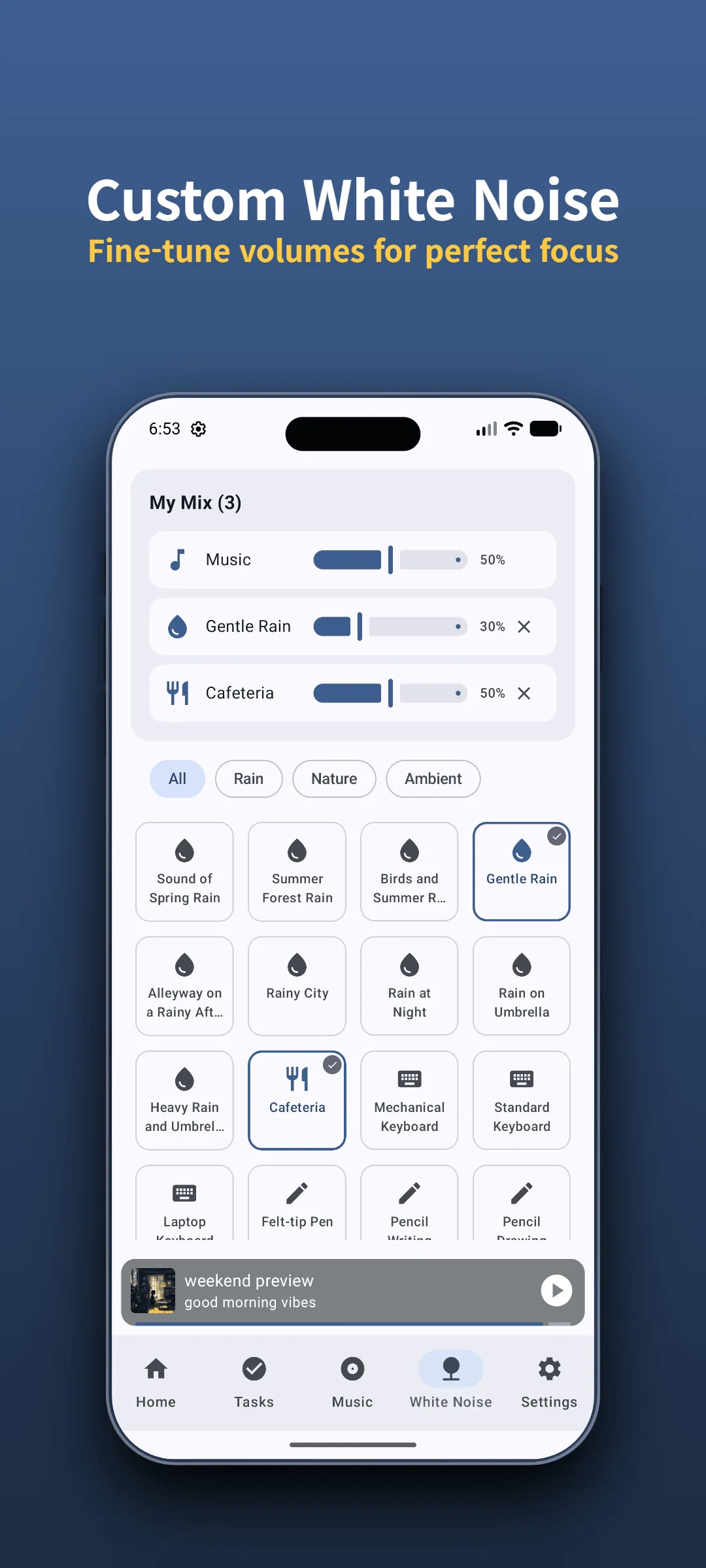
Hear StudyAide's sound mix for yourself
Adjust white noise and background music volumes separately to build a combination that fits you. White noise plays offline too.
Install Free on Google PlayThe difference you notice after a few days
Considering a scenario where you use both apps interchangeably in everyday study environments, their difference becomes clear: Forest manages phone usage, while StudyAide shapes your sound environment.
Forest is strong at making you "not look at your phone." It's a shame to let the tree wither, and with Time Guard blocking certain apps entirely, they won't open even if your hand reaches for them. For people whose habit of checking their phone is the biggest distraction, these visual and physical restrictions can serve as a useful deterrent. In return, sound is a side feature rather than the core, so it's less suited to building a mix for a noisy environment.
StudyAide is strong at building "a sound environment you can focus in." In noisy places like a café or a shared space, mixing rain and background music to balanced volumes makes surrounding conversation noticeably less distracting. In return, it doesn't block phone use itself, so you need the will to put the phone down yourself.
So the two apps don't really compete; they take on different problems. If the phone is the problem, Forest; if noise is the problem, StudyAide.
When to choose which
- If you want to share focus time with friends and motivate each other → Forest. The social feature of planting trees together plays a big role.
- If you want to forcibly block social media or game apps entirely while studying → Forest. Time Guard blocks the use of certain apps.
- If you don't even want to meet a login screen, and don't want records sent to a server → StudyAide. Use it with no account right after install, and all records are stored only on the device.
- If you want to use the timer and white noise as-is in a library, reading room, or plane with no internet → StudyAide. The timer and white noise work offline as-is. The background music album is streamed, so it needs data.
- If you want to layer white noise and background music at the same time to build your own focus environment → StudyAide. It plays white noise and background music at once and adjusts each volume separately.
For how to adjust and use the Pomodoro timer, see the Complete Guide to the Pomodoro Timer; for sound combinations to listen to while focusing, see the What Are Binaural Beats? guide.
If you don't need the motivation of growing a tree or social features, and an account-free sound combination and offline usability matter more, StudyAide is simpler. What you can use without paying is the Pomodoro timer, Goals (Tasks), basic stats, white noise, and the base background music album. In return, ads are shown during free use. A subscription or lifetime unlock removes the ads and opens unlimited Goals (Tasks) preset creation.
Sources
- Ward, A. F., Duke, K., Gneezy, A., & Bos, M. W. (2017). Brain Drain: The Mere Presence of One’s Own Smartphone Reduces Available Cognitive Capacity. Journal of the Association for Consumer Research. Research demonstrating that the mere presence of a smartphone within reach can reduce available cognitive capacity and working memory.
- Forest official site: free vs. Forest Plus features (Time Guard app limits, Ambient Sounds library, Mindful Space soundscapes, planting real trees, Plant Together). Checked in September 2026; plans and features may change.
- This comparison is based on official websites, app store listings, and public support documentation verified as of September 2026. For policy changes or corrections, please reach out to StudyAide Support (studyaide.help@gmail.com) for prompt review and updates.
No account — start with sound mixed to your taste
Usable right after install with no login and no server sync. Mix white noise and background music yourself to see if it fits.
 Install Free on Google Play
Frequently asked questions
Can I use both apps together?
Yes, no problem. Many users grow a tree with Forest while it blocks phone use, and during that time play white noise or background music from StudyAide. The two apps complement each other more than they overlap.
Do I really need Forest's paid features?
It depends on your purpose. Forest gives you core features free, including the timer, Time Guard for one app, one Mindful Space soundscape, and Plant Together. The paid Forest Plus subscription adds multi-app blocking, all Mindful Space soundscapes, and planting real trees. Judge by how much you need that expansion.
Can I focus without a phone-blocking feature?
StudyAide doesn't block phone use itself. Instead it mixes white noise and background music with separate volume control to make surrounding noise less distracting, and it builds a rhythm of focus and rest with the Pomodoro timer. It's closer to creating an environment that's good for focusing than forcing you off your phone.
Does StudyAide plant trees too?
No. StudyAide has no gamification element for growing or planting trees. It also offers no real tree-planting partnership or social features. It focuses on practical features like sound, the timer, and stats.
People Behind StudyAide (Pinkaide)
Where audio craftsmanship meets lightweight app engineering
StudyAide is created jointly by a sound producer from Pinkaide (producing functional music since 2008, managing YouTube Content ID rights since 2016, and running the 120K-subscriber Relaxing Music channel) and an app developer building lightweight tools. Instead of generic AI loops or unverified tracks, we draw on years of acoustic expertise to craft fatigue-free, carefully mastered soundscapes designed for focus, relaxation, and deep sleep.
Related reading
StudyAide vs Focus To-Do: Task App or Focus Sound?
Focus To-Do manages tasks and syncs across devices; StudyAide offers free white noise, sound mixing, and no-login use. See which fits how you study.
Free Pomodoro App With No Login: 5 Things to Check
Looking for a study timer that needs no login? Check five things before you install: account rules, data storage, offline use, ads and payments, and sound.
StudyAide vs Brain.fm: Subscribe to Focus Music?
Brain.fm sells focus music by subscription; StudyAide lets you mix white noise and music with no account. Compare sessions, research claims, and offline use.