StudyAide vs Brain.fm: Subscribe to Focus Music?
By StudyAide (Sound Producer & App Developer)·Published ·Updated
Brain.fm and StudyAide both deal with "what you listen to while focusing," but their approaches are opposite. Here's the breakdown by one question: subscribe to finished focus music, or build your own sound environment.
What Brain.fm does well
Brain.fm sells "functional music it says is designed to aid focus" on a subscription. You pick a session by purpose — Focus, Relax, Meditate, Sleep, Nap — and it plays tracks built for that purpose. It's a one-button start, with nothing to decide about what to listen to.
The company says its music uses patented neural stimulation technology to induce "strong neural phase locking," and states that its approach is different from binaural beats. It points to a 2024 study conducted with researchers at Northeastern University and published in the peer-reviewed journal Communications Biology, which reported that music modulated in a particular way improved sustained attention, with a larger improvement in participants who had pronounced attention difficulties. These claims are Brain.fm's and its research collaborators', though — the general view in the field on functional music and binaural beats is closer to "brainwaves do reliably entrain to the sound, but the actual focus benefit is small and condition-dependent." Independent replications are still limited.
Brain.fm supports the web, iOS, Android, and desktop apps, so it's easy to carry the same session across devices. Playing a finished session built for a purpose, and research-forward design, are Brain.fm's approach that sets it apart from StudyAide.
What StudyAide does well
Instead of playing a finished session, StudyAide layers white noise and background music at the same time and lets you adjust each volume separately. You lay rain quietly underneath and put background music on top — building your own sound environment. The background music is also organized by purpose — focus, binaural beats, lo-fi, relaxation — so you can pick a track that fits the moment and layer it with white noise. White noise is all free and plays without an internet connection. Background music, the base album included, is streamed and needs a data connection to play.
There's no account requirement from the start. Install it and use it right away; your focus history and settings stay on the device, not on a server. That's different from Brain.fm asking for an email account and payment method upfront just to start a trial. You set a rhythm of focus and breaks with the Pomodoro timer, and you also get a full-screen desk mode that shows the timer and a small music player over a background image or video and basic stats built from your Pomodoro history.
StudyAide doesn't claim to be designed to induce a particular brain state and doesn't guarantee a medical effect. The value of white noise is closer to masking — covering surrounding noise so it's less distracting — and effects vary widely between people. If jumping straight into focus with sounds you chose, no account, fits you better than subscribing to finished focus music, StudyAide is a good fit.
Brain.fm vs StudyAide at a glance
| Brain.fm | StudyAide | |
|---|---|---|
| Music approach | Plays a finished session built for a purpose | You mix category-organized music with white noise yourself |
| Music curation | Purpose-built sessions (focus, relax, sleep, meditate, nap) | Music by category (focus, binaural beats, lo-fi, relaxation, etc.) |
| Research-backed design claim | Yes (cites its own and partner-university research) | No (makes no effect claim or medical guarantee) |
| White noise | Not a core feature | All free, simultaneous mixing + independent volume |
| Offline playback | Download supported in the mobile app with a paid subscription | White noise and timer offline (background music is streamed) |
| Account required? | Required (account and payment method to start a trial) | No account for any feature |
| Cross-platform | Web, iOS, Android, desktop | Android app |
| Free scope | No permanently free version; converts to paid after the trial | All white noise, the currently offered background music albums, timer, and basic stats free; subscription or lifetime unlock removes ads |
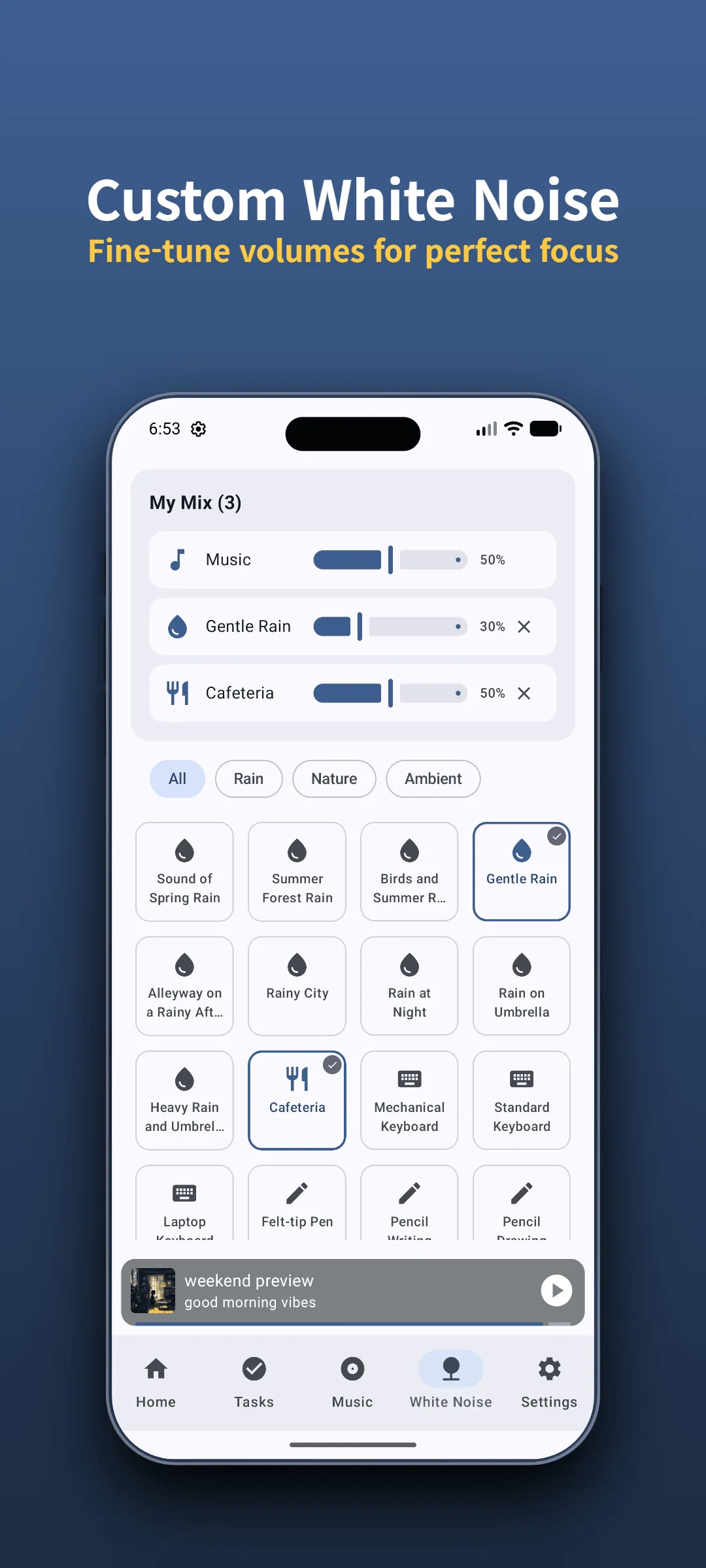
Hear StudyAide's sound mix for yourself
Adjust white noise and background music volumes separately to build a mix that fits you. White noise plays offline too.
Install Free on Google PlayThe difference you notice after a few days
Considering a scenario where you use both apps interchangeably in everyday study or work environments, their different focuses become clear.
Brain.fm's strength is "start right away, nothing to pick." Tap a session type and the day's focus music just flows; drop it into a deep-work routine and it works like a start signal. But all the music sits behind a subscription, requiring payment once the trial ends. Starting a free trial requires payment details upfront, and without manual cancellation before the period ends, it automatically converts to a recurring paid subscription, requiring careful tracking of renewal dates.
StudyAide's strength is "keeping your sound environment set." In a busy café, setting the two volumes to suit the place makes the conversation at the next table less distracting. A combination you set once stays put, and white noise keeps playing even when the connection drops. StudyAide also organizes its background music by purpose — focus, binaural beats, lo-fi, relaxation — but it doesn't play a finished, purpose-built session for you the way Brain.fm does. If you want focus music that just flows without you touching it, that can feel lacking.
So the two apps don't really compete — they handle different problems. If you want to subscribe to finished focus music, Brain.fm; if you want to build your own sound environment without an account, StudyAide.
When to choose which
- If you want one-button, purpose-built focus music and can absorb the subscription cost → Brain.fm. Session-type selection and curation carry a lot of the weight.
- If research-forward design and cross-platform support (web and desktop included) matter → Brain.fm. It's easy to carry the same session across devices.
- If having to hand over an email account and payment method before a trial feels like too much → StudyAide. Install it and use it without an account; all records stay on the device.
- If you want to layer white noise and background music at once and balance each volume → StudyAide. It fixes the combination you build rather than a finished track.
- If you want your sound to keep going on a subway or in a library where the signal keeps dropping → StudyAide. White noise plays without internet and the timer works as usual.
If account-free sound control and offline white noise matter more to you than subscribing to music said to be designed for focus, StudyAide is the simpler choice. You can use the Pomodoro timer, Goals (Tasks), basic stats, white noise, and the currently offered background music albums without a subscription. Ads appear while you use it for free; choose a subscription or lifetime unlock and you can remove them and create unlimited Goals (Tasks) presets.
For what binaural beats and functional music actually rest on, see the Binaural Beats Guide; for how to choose a free sound app with no subscription, see how to choose a free white noise app with no subscription.
Sources
- Woods, K. J. P., et al. (2024). Rapid modulation in music supports attention in listeners with attentional difficulties. Communications Biology. A collaborative study by Brain.fm and Northeastern University researchers examining the impact of amplitude-modulated music on sustained attention using fMRI and EEG.
- Brain.fm Support: Verification of offline session downloads on iOS and Android mobile apps (excluding web and desktop).
- This comparison is based on official websites, app store listings, and public support documentation verified as of September 2026. For policy changes or corrections, please reach out to StudyAide Support (studyaide.help@gmail.com) for prompt review and updates.
No subscription — start with the sound you built
No login, no payment method — usable right after installing. Mix white noise and background music yourself to see if it fits.
 Install Free on Google Play
Frequently asked questions
Can I use both apps together?
Yes. You can run a Brain.fm session and layer thin white noise like rain from StudyAide on top to mask surrounding noise. The two apps aim at different things, so they complement each other more than they overlap.
Can I use Brain.fm for free?
As of this writing (September 2026), Brain.fm has no permanently free version. It offers a free trial of a few days, requires an account and payment method upfront to start, and converts to paid automatically when the trial ends. The exact terms can change, so check Brain.fm directly before installing.
Is StudyAide's music also designed to boost focus?
No. StudyAide centers on white noise and ambient-style background music. It doesn't claim to be designed to induce a particular brain state and doesn't guarantee a medical effect. Its value is in masking — covering surrounding noise so it's less distracting — and in letting you set white noise and music volumes separately to build your own environment.
Can I use it offline?
In StudyAide, white noise and the timer work offline, while background music — the base album included — is streamed and needs a data connection to play. Brain.fm says it supports offline playback by downloading tracks in the mobile app while you have a paid subscription (the web player is online-only).
How do the subscription structures differ?
With Brain.fm, all the music sits behind the subscription, so playback stops if you stop subscribing. In StudyAide, all white noise and the currently offered background music albums, the Pomodoro timer, and basic stats are free; ads are shown while you're on the free plan, and a subscription or lifetime unlock removes them.
People Behind StudyAide (Pinkaide)
Where audio craftsmanship meets lightweight app engineering
StudyAide is created jointly by a sound producer from Pinkaide (producing functional music since 2008, managing YouTube Content ID rights since 2016, and running the 120K-subscriber Relaxing Music channel) and an app developer building lightweight tools. Instead of generic AI loops or unverified tracks, we draw on years of acoustic expertise to craft fatigue-free, carefully mastered soundscapes designed for focus, relaxation, and deep sleep.
Related reading
StudyAide vs Endel: Adaptive Sound vs Your Mix
Endel generates adaptive soundscapes from time, weather, and heart rate; StudyAide keeps the mix you set, with no account. Compare adaptivity, wearables, and cost.
Binaural Beats Explained: Facts and Common Myths
A non-medical guide to how binaural beats work, where the evidence stops, and how to use them for studying, working, and resting, plus how StudyAide plays them.
Forest App Alternative: StudyAide vs Forest
Forest grows a tree to keep you off your phone; StudyAide builds a sound environment. Compare app blocking, gamification, sound mixing, offline use, and accounts.