Free White Noise App, No Subscription: 5 Checks
By StudyAide (Sound Producer & App Developer)·Published ·Updated
Even when an app is labeled "free," what you can actually use varies a lot. Here are five criteria to check before you install.
Why do most white noise apps require a subscription?
For white noise and ambient sound apps, the freemium model is effectively the standard. The download is free, a handful of sounds are usable, and the full library unlocks with a subscription or a one-time purchase.
Lately the trend leans toward subscriptions. Apps that once let you pay once and keep using them have dropped that option, and some have added a subscription wall to their mobile apps where there wasn't one before, capping free use with a playback time limit. Recording and curating sounds and maintaining the app cost money over time, so from a developer's side it's an understandable choice.
The problem is that this shift isn't obvious to someone who installs based on the store's "free" label alone. In user reviews across major app stores for freemium sound apps, common complaints repeatedly include: "ads are frequent enough to block playback," "at some point it stopped working without a subscription," and "the sounds I actually need are all locked." "Free" means the download is free — not that the sounds are.
5 things to check when choosing a free white noise app
1. Are the sounds actually free?
Check how many sounds are open on the free plan, and whether the ones you'd use are among them. Sometimes basic sounds like rain or waves are free while café noise or specific ambiences are locked; sometimes only two or three are open and everything else is blocked. Several lock icons in the store screenshots are a sign that the free tier is narrow.
2. Does it play offline?
Check whether sound plays in places with an unstable connection — a library, a study room, a subway, a plane. If sound files are stored on the device (a local approach), they play right after install. With a streaming approach, even a "free" app requires you to play a sound online once to cache it before it works offline. If you're often offline, this difference is bigger than it looks.
3. What form do the ads take?
The placement and frequency of ads matter more than the ads themselves. A banner at the bottom of the screen doesn't interrupt playback, but a full-screen ad every time you switch sounds or start the timer makes the app hard to use as a focus tool. Check whether "too many ads" comes up repeatedly in reviews.
4. Is there a timer?
Check whether there's a feature that automatically stops the sound after a set time. It's useful if you want to schedule playback for winding down before sleep or for a study session. If it also includes a timer that alternates focus and breaks, like Pomodoro, you can handle sound and time management in one app.
5. Does it require an account?
Check whether a sign-up or login screen blocks you from using the app on first launch. Listening to sound doesn't inherently require an account, so if one is required, judge by whether there's a reason for it (sync, social features) and whether you need that feature.
These five criteria also connect to how you use white noise in the first place. If you want to know how to build a focus environment with sound, see the Binaural Beats Guide; for how to use it alongside a timer, see the Complete Guide to the Pomodoro Timer.
How to check on the store before installing
You can screen out a few things before installing. The methods below are as of the time of writing (September 2026).
- Search the store description: See how often words like "subscription," "Pro," "Premium," "unlock," and "free trial" appear. If they show up frequently, the core features are likely behind a paywall.
- Check the screenshots: Look for payment prompts or login screens in the captures, and count the lock icons in the sound list.
- Complaint patterns in reviews: Check whether "too many ads," "can't use it without a subscription," and "doesn't work offline" come up repeatedly.
- Data safety section: Look at the store's data safety section for what information is collected and where it's sent.
Comparing by app type
Free white noise apps fall roughly into three types: the subscription-first type, where core sounds sit behind payment; the streaming-dependent type, which doesn't work offline and limits playback time; and the local-free type, which stores sound files on the device and opens them for free.
Comparing free white noise app types
| Subscription-first | Streaming-dependent | StudyAide | |
|---|---|---|---|
| Are the sounds actually free? | Only some free, most unlocked by subscription | Free but often limited by playback time or count | All white noise free |
| Offline playback | Varies a lot by app | Needs an online play first; not instant in a library or on a plane | White noise works offline right after install (music albums are streamed) |
| Ad format | Ads on the free tier, removed on payment | Ads tend to be frequent on the free tier | Shown on the free plan, removed with subscription or lifetime unlock |
| Timer | Varies a lot by app | A stop timer at most | Includes a Pomodoro timer |
| Account required | Login required for some features | Login often required for sync | No account for any feature |
| Sound mixing | Often plays one sound at a time | Curation and sound variety are the strength | White noise + background music at once, independent volume |
The subscription-first type has a broad, curated sound library, and the streaming-dependent type's strengths are sound variety and regular new-sound updates. The local-free type, by contrast, has a relatively smaller range of sounds, but a wider free scope and its core sounds work offline as-is.
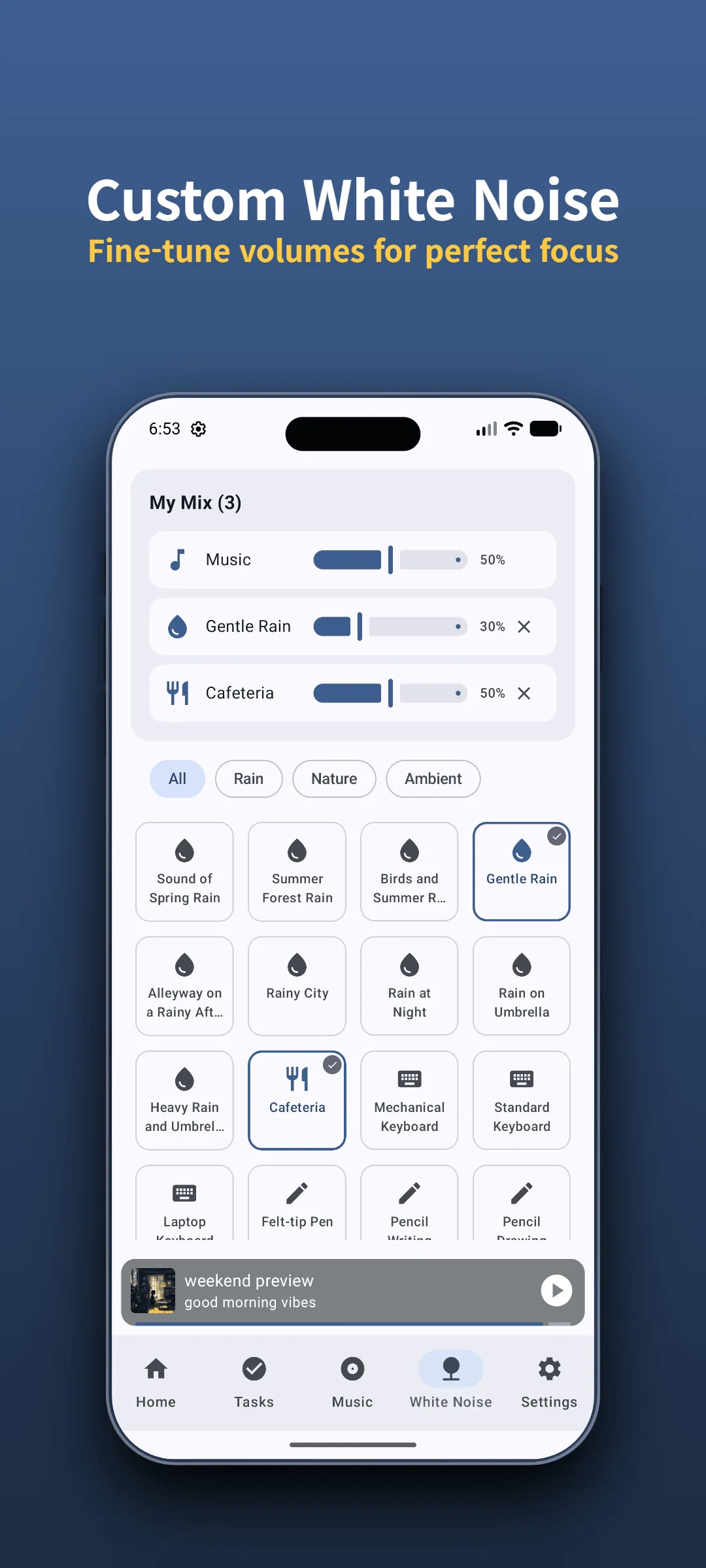
Hear StudyAide's free white noise for yourself
Adjust white noise and background music volumes separately to build a mix that fits you. White noise plays offline too.
Install Free on Google PlayThe difference you notice after a few days
Rotating through several free apps in the same week reveals the differences hidden behind the word "free."
The subscription-first type is satisfying for the first few days — the free sounds get you by. But once you find yourself reaching for a specific sound and realize it's locked, the payment prompts start to stand out. The streaming-dependent type is fine at home or the office, and then you hit playback dropouts once you're somewhere with a weak connection.
The local-free type is the opposite. At first the smaller range of sounds can feel limiting, but in practice the white noise you play often narrows down to two or three anyway. That it doesn't drop out offline, and that the volume balance you set stays put, is what feels convenient the longer you use it.
One thing is worth being clear about: it's hard to say white noise improves focus for everyone. There's research suggesting a small benefit for people with pronounced attention difficulties, while other observations note it can be a distraction for those without them. Effects vary widely between individuals, and the app doesn't guarantee a medical effect. The practical use of white noise is closer to masking — covering surrounding noise so it's less distracting. In psychoacoustics, auditory masking works because abrupt acoustic spikes (keyboard clatter, doors closing, nearby chatter) trigger sudden arousal in the auditory cortex; a steady, broadband noise floor lowers the signal-to-noise ratio (SNR), making the brain less reactive to those sudden intrusions.
When to choose which
- If a broad, curated sound library matters and you can absorb the subscription cost → subscription-first. Sound range and updates are the strength.
- If you'll only use it where the connection is stable, like home or the office, and want new sounds added continuously → streaming-dependent.
- If you want uninterrupted white noise in places with an unstable connection, like a library or a plane → local-free (StudyAide). White noise and the timer work offline; music albums are streamed and need data.
- If you don't want to see a login screen at all, or have your records sent to a server → StudyAide. Every feature works without an account, and records stay on the device.
- If you want to layer background music over white noise for your own mix → StudyAide. It plays both at once with independent volume control.
StudyAide keeps all of its white noise free, and the background music albums currently offered are free to listen to as well. The Pomodoro timer, Goals (Tasks), basic stats, and the full-screen desk mode are all free. Goals (Tasks) can be created for free, though there's a limit on how many you can register. Ads are shown while you're on the free plan; a subscription or lifetime unlock removes the ads and adds unlimited Goals (Tasks) preset creation. The timer and white noise work offline, but background music — the base album included — is streamed and needs a data connection to play.
If you're also looking for a free timer you can use without an account, how to choose a free pomodoro app with no login lays it out by the same criteria.
Sources
- Systematic Review and Meta-Analysis: Do White Noise or Pink Noise Help With Task Performance in Youth With Attention-Deficit/Hyperactivity Disorder or With Elevated Attention Problems? (2024). Journal of the American Academy of Child & Adolescent Psychiatry. OHSU News summary. Across 13 studies with 335 children and young adults, white and pink noise gave a small but statistically significant benefit to those with ADHD and slightly negative effects for those without it.
No subscription — start right now
Install the app and use all of the white noise and the Pomodoro timer immediately, no sign-up. White noise plays offline too.
 Install Free on Google Play
Frequently asked questions
If the app is free, why does it show ads?
Keeping an app free usually means covering costs through ads or paid upgrades. What matters is the ad format. A banner at the bottom of the screen barely interrupts playback, but a full-screen ad every time you switch sounds makes a free app hard to use. StudyAide shows ads while you're on the free plan; a subscription or lifetime unlock removes them.
Does white noise still play offline?
It depends on the app. If sound files are stored on the device (a local approach), they play instantly without a connection. With a streaming approach, you have to play a sound online once to cache it before it works offline — and some apps don't allow that at all. In StudyAide, the white noise and the timer work offline right after install. Background music albums are streamed, so playing them needs a data connection.
Do the sounds lock if I don't subscribe?
Many apps work that way. Often only two or three sounds are open on the free plan, with the rest unlocked by subscription or purchase. You can screen for this before installing by checking the store description for words like "Pro," "Premium," or "unlock," and looking for lock icons in the screenshots. StudyAide keeps all of its white noise free.
Without an account, what happens to my focus history?
Apps without an account mostly store history on the device only. Since nothing syncs to a server, your previous records don't carry over when you switch devices. In exchange, there's no email or password sitting on a server, which limits how your personal data could be exposed.
Can I play white noise and music together?
It varies by app. Some play one sound at a time; others let you layer several. StudyAide plays white noise and background music at the same time with independent volume control, so you can lay rain quietly underneath and put music on top.
People Behind StudyAide (Pinkaide)
Where audio craftsmanship meets lightweight app engineering
StudyAide is created jointly by a sound producer from Pinkaide (producing functional music since 2008, managing YouTube Content ID rights since 2016, and running the 120K-subscriber Relaxing Music channel) and an app developer building lightweight tools. Instead of generic AI loops or unverified tracks, we draw on years of acoustic expertise to craft fatigue-free, carefully mastered soundscapes designed for focus, relaxation, and deep sleep.
Related reading
StudyAide vs Brain.fm: Subscribe to Focus Music?
Brain.fm sells focus music by subscription; StudyAide lets you mix white noise and music with no account. Compare sessions, research claims, and offline use.
StudyAide vs Endel: Adaptive Sound vs Your Mix
Endel generates adaptive soundscapes from time, weather, and heart rate; StudyAide keeps the mix you set, with no account. Compare adaptivity, wearables, and cost.
Free Pomodoro App With No Login: 5 Things to Check
Looking for a study timer that needs no login? Check five things before you install: account rules, data storage, offline use, ads and payments, and sound.